Within Briq, a merchant is a company selling online, while a provider is a third party Venue Management System that manages bookings for these merchants. When merchants want to sell products online through Briq, the merchant needs to supply inventory data on which products they want to sell, which (limited) resources must be available for these products to be sold, and the availability of these resources. Once a booking is placed, the merchant will be asked to confirm the booking. After that, they will be notified of any relevant changes to that booking.
Public API
This section describes how to use the Public API in order to use the Provider Integration scenario. Supplying your inventory to Briq includes sending resources, products and availability through the Public API, as well as some manual steps in the briq.app. Before you start, make sure you've contacted Briq Customer Success to help you get started and provide you with an initial environment setup and credentials.
Supplying your inventory
To sell the products using Briq, a merchant needs to go through the following steps. We'll be assuming you're already familiar with working with our briq.app, and the Briq Terminology.
- Send a list of your resources to the Create resources REST endpoint. These will be imported as external resources.
- Send a list of your products to the Create products REST endpoint. These will be imported as external products.
- Use the briq.app to create resources based on the external resources that were created earlier.
- Use the briq.app to create products based on the external products that were created earlier.
- Use the briq.app to manually create deals.
- Send the availability of the external resources using the Create availability feeds REST endpoint
Note: Availability can also be sent in before configuring the resources and products in briq.app, but it will be shown in our funnel once the whole configuration is done.
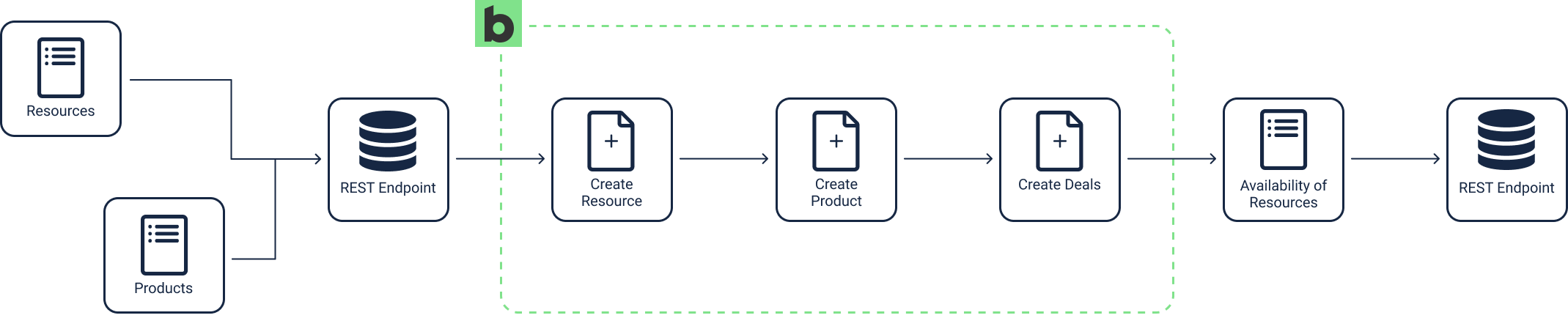
After these steps - and completing the full configuration of your merchant account in Briq - you'll be ready to start selling online deals through our funnel.
Receiving new bookings
During the booking placement in the funnel, we first do an Assess booking call to make sure your (provider) system allows the booking. Only if we receive confirmation, will we allow the booking to be completed.
After the booking is created in the funnel, your system will receive a Webhook notification message for any further updates to the booking, for example when the status or the payment changes. Then you can use our Booking endpoint to retrieve all the details about the booking.
Please note that configuration in briq.app is needed in order to receive webhooks for specific events.
Each time a booking is created, you should again send in the updated availability of the external resources using the Create availability feeds REST endpoint. Note how you only need to update the availability for the resource and date which are affected by the booking.
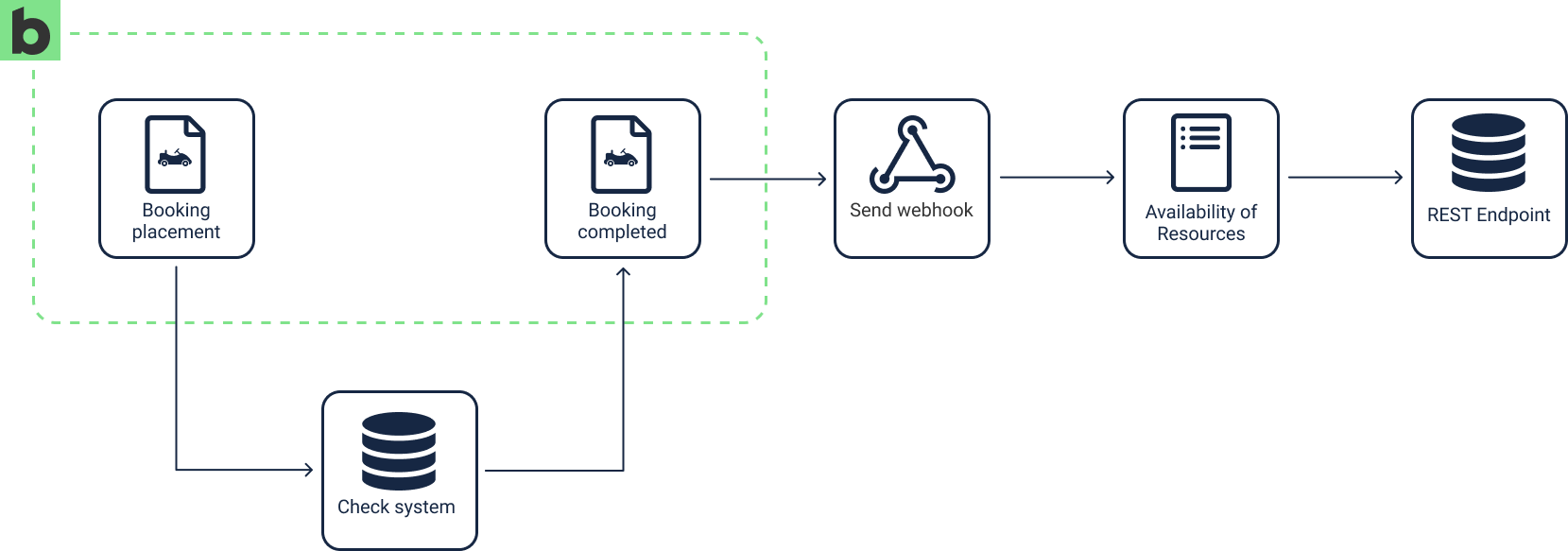
Updates in the provider system
Please note that Briq needs to be up-to-date on all relevant changes in the provider system all the time. Otherwise, the Briq funnel might offer products or timeslots to customers that are no longer available. So please make sure each and every change in resources, products and availability is sent in using the corresponding endpoint as soon as possible after the change. This also includes changes that are not due to bookings through the Briq funnel.
Was this article helpful?
That’s Great!
Thank you for your feedback
Sorry! We couldn't be helpful
Thank you for your feedback
Feedback sent
We appreciate your effort and will try to fix the article