A Voucher or Gift card is a credit against future purchases with fixed amount or percentage discount. Briq allows voucher systems to integrate their product so that merchants will be able to use their vouchers within the booking flow.
Example Use case:
- A consumer makes a booking
- They add voucher code and the Voucher System performs validation on the voucher
- If the voucher is valid, after the booking is created, the voucher is redeemed by the Voucher System and credit is used, otherwise it is not marked as used.
- The consumer then pays the remaining difference.
- If for any reason a refund is necessary for a booking that used a voucher, a refund request is created which performs a Rollback on the voucher in the Voucher System.
- Inventory sync
- If the Voucher/Gift card system allows setting up specific voucher rules (e.g. Voucher only applies on a specific product/deal, or only applies for a specific Business unit) then an Inventory sync is needed in order to do the setup.
Resource sync
The first step is to do a pull on all the existing resources. Use the Get all Resources endpoint to fetch the data. After this call, whenever a product is created or modified, corresponding Webhook is sent. When a Webhook is sent, use the Get a resource by key endpoint to get the product with a correct key. Depending on the Webhook Event, whether Created or Modified, the right action should be performed on your end.
Product sync
The second step is to do a pull on all the existing products. Use the Get all Products endpoint to fetch the data. After this call, whenever a product is created or modified, corresponding Webhook is sent. When a Webhook is sent, use the Get a product by key endpoint to get the product with a correct key. Depending on the Webhook Event, whether Created or Modified, the right action should be performed on your end.
Deal sync
The third step is to do a pull on all the existing deals. Use the Get all Deals endpoint to fetch the data. After this call, whenever a product is created or modified, corresponding Webhook is sent. When a Webhook is sent, use the Get a deal by key endpoint to get the product with a correct key. Depending on the Webhook Event, whether Created or Modified, the right action should be performed on your end.
Validate
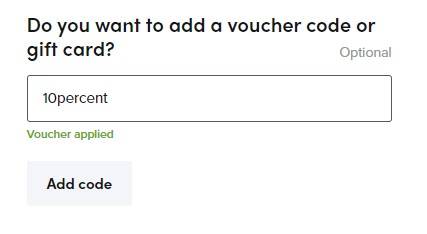
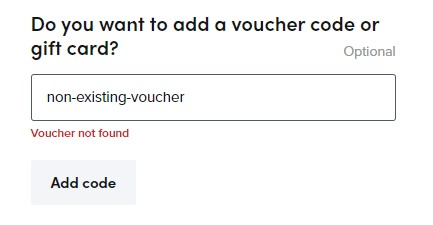
Once a voucher code has been added, the Voucher System performs validation on the voucher.
Here is an example of successful validation of a voucher code:
Here is an example of unsuccessful validation of a voucher code:
Redeem
If the voucher is valid, after the booking is created, the voucher is redeemed by the Voucher System and credit is used. If the voucher is invalid, it remains unused.
Rollback
If a Refund request is created for any reason, Rollback is performed on the voucher by the Voucher System. If the Rollback is successful then the booking will be reset to the original price before any Voucher has been applied to it.
Was this article helpful?
That’s Great!
Thank you for your feedback
Sorry! We couldn't be helpful
Thank you for your feedback
Feedback sent
We appreciate your effort and will try to fix the article